
Privacy
A journal without an account
Reflexy is a journal without an account: entries and photos stay on your device, app lock protects the app, and backups are encrypted files you control. Journal content is local unless you choose a backup or export. Apple and RevenueCat process purchase metadata, not your entries.
On your device
Where your journal lives
Your Reflexy journal is stored on your device. Stories, photos, feelings, needs, aims, activities, and tags are kept inside the app on your iPhone or iPad, protected by iOS file protection. There is no Reflexy account and no developer server holding your journal; journal content is local unless you choose a backup or export.
No Reflexy account
There is nothing to sign up for, in the app or on this website. Optional iCloud backups use your own Apple iCloud account, and purchases follow your Apple Account.
Stored with iOS file protection
Stories, photos, and everything you select are kept inside the app's own space on your iPhone or iPad, covered by iOS file protection.
No developer server for journal content
Reflexy does not operate a server that receives entries. Your journal, photos, and backup contents are not sent to the developer or to RevenueCat.
System device backups are separate
iOS device backups to iCloud or a computer are controlled by your device and Apple settings, independently of Reflexy's optional backup feature.
Privacy & Security
App lock
App lock in Reflexy is on by default and protects the app with a six-digit Reflexy passcode, with Face ID or Touch ID as an option on supported devices. You can skip setup when you first open the app, and you can turn App lock off later in Settings if you prefer immediate access.
- iOS performs the biometric check. Reflexy receives only the success or failure result, never a face or fingerprint template.
- The app-lock passcode is not the backup key. Backups are protected separately, by a recovery key and a recovery code.
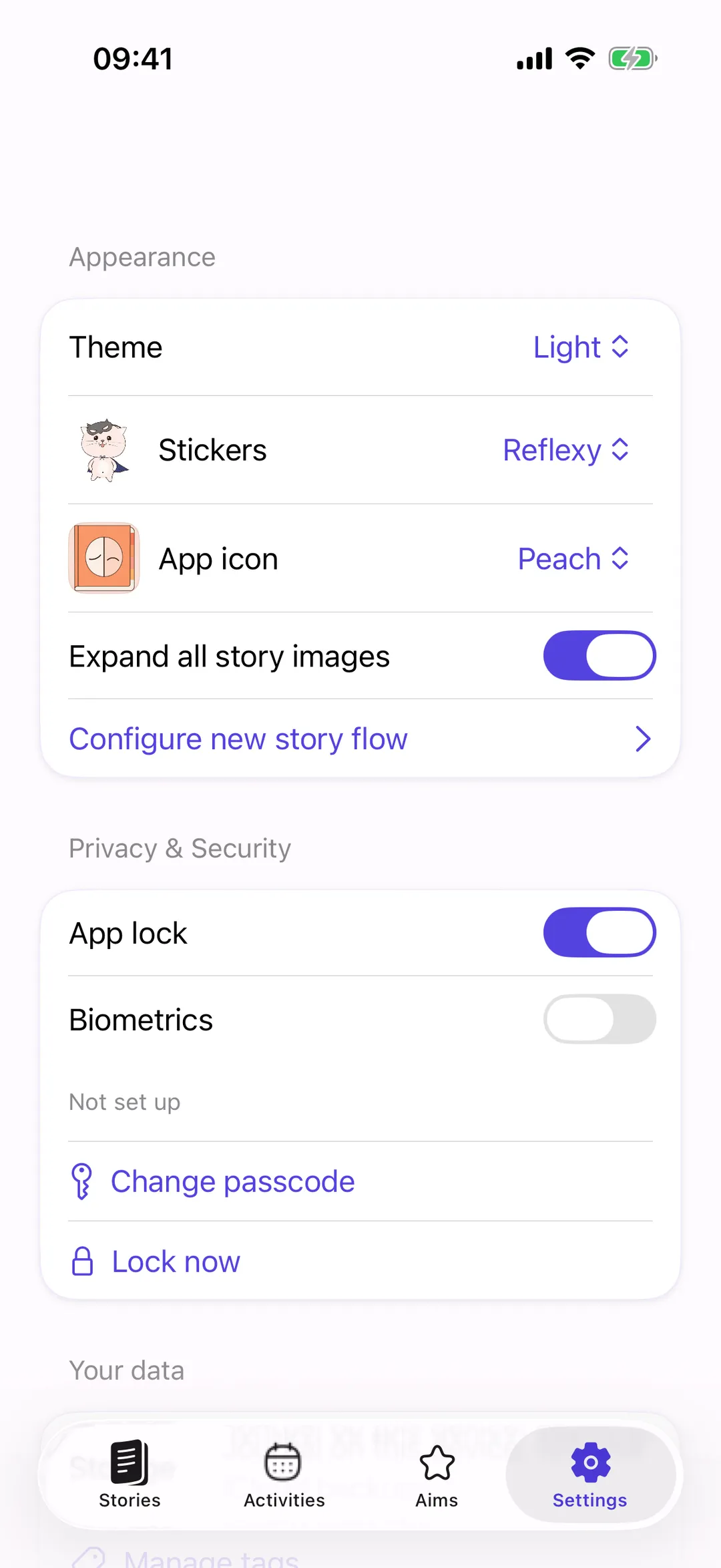
- In Settings, under Privacy & Security, you will find “App lock”, “Biometrics”, “Change passcode”, and “Lock now”.
Backups
Backups you control
Backups in Reflexy are saved copies, not live sync. Every new .reflexy file is encrypted by Reflexy before it is exported or uploaded to iCloud; journal data, photo names, and photo contents are inside the encrypted payload. You decide when a backup is made and where the copy goes, and Reflexy never asks for your Apple Account password.
Three ways to keep a copy
Export a .reflexy file, save a backup to Reflexy's private iCloud area, or turn on automatic iCloud backups. Automatic backups are off by default and depend on the app having a chance to run and on iCloud being available.
Saved copies, not live sync
Import a backup on another device to restore or transfer your journal. Import replaces the current journal after you confirm and does not merge two journals; a failed import leaves the current journal in place.
Your recovery code
The recovery key normally becomes available on another device through iCloud Keychain, and Reflexy also gives you a recovery code to save privately. Without the matching key or code, an encrypted backup cannot be opened, not by you and not by the developer. There is no reset.
Older backups
Compatible older Reflexy backups can be imported. A plaintext legacy iCloud copy is replaced only after an encrypted replacement has been created, checked, and uploaded.
Purchases
What Apple and RevenueCat process
Reflexy has no advertising, advertising tracking, or cross-app tracking, and no developer-operated server for journal content. Apple and RevenueCat process purchase metadata so that purchases can be validated, restored, and refunded, and for purchase analytics. That metadata does not include your entries, photos, app-lock passcode, or backup contents, which Reflexy does not send to them.
| Who | What | Why |
|---|---|---|
| Apple (App Store) | Purchase history, transaction and product identifiers, dates, and access status for the free trial and lifetime access | Payments and receipts, restoring purchases, refunds, and recognizing purchases of earlier Reflexy versions |
| Apple (iCloud) | Encrypted .reflexy backups you choose to save, stored in your own iCloud account, and the backup recovery key in iCloud Keychain | Keeping a copy you can import on another device. Only if you turn backups on |
| Apple (iOS) | Face ID or Touch ID checks, system diagnostics, and device backups | Unlocking App lock, and device features you control in your iOS settings |
| RevenueCat | The same purchase metadata plus an automatically generated anonymous app-user identifier. Automatic collection of device identifiers is turned off | Verifying and restoring access, and purchase analytics |
None of this includes your entries, selected feelings, photos, app-lock passcode, or backup contents. Erasing your journal does not delete purchase records; they stay with Apple and RevenueCat.
No ads, no tracking
What Reflexy does not do
Reflexy does not show ads, does not use advertising or cross-app tracking, and does not record behavioral analytics about how you use your journal. It does not send journal entries, selected feelings, photos, app-lock passcodes, or backup contents to the developer or RevenueCat, and it does not ask for your Apple Account password.
- No Reflexy account, sign-in, or member area, in the app or on this website
- No ads, no advertising tracking, and no cross-app tracking
- No behavioral analytics about how you use your journal
- No developer-operated server for journal content
- No journal entries, selected feelings, photos, app-lock passcodes, or backup contents sent to the developer or RevenueCat
- No AI: nothing reads your text or photos
- No general photo-library access; Reflexy receives only the photo you pick
- No request for your Apple Account password
- No automatic support reports; you preview or exclude the report and send the email yourself
What is processed: purchase metadata through Apple and RevenueCat, and any backups you choose to store in your iCloud account. Apple's own device backups and system diagnostics follow your iOS settings.
Photos
One photo per Story, picked by you
A Story in Reflexy can hold one photo. Attaching it uses the system photo picker, so Reflexy receives only the photo you select and does not request general access to your photo library. The photo is stored with your journal on the device. It leaves the device only when you choose a backup or an export.
- Deleting a Story removes its photo as well.
- Photo names and photo contents are inside the encrypted payload of every new .reflexy backup.
- In Settings, “Expand all story images” decides whether photos start expanded or collapsed.
Your data
Erase journal on this device
“Erase journal on this device” in Reflexy's Settings removes the local journal, local photos, retained local backup exports, and temporary working files, then restores the built-in suggestions. It does not delete copies elsewhere: iCloud backups, files exported to other places, system device backups, purchase records, the app-lock credential, and the backup recovery secret all stay.
Settings → Your data → Erase journal on this device
What it deletes
- All Stories and their photos
- Custom Activities, Aims, categories, and tags; the built-in suggestions are restored
- Local backup exports kept by the app
- Temporary working files
What it does not delete
- iCloud backups: delete them in Reflexy's iCloud backups list or in your iCloud settings
- Files you exported elsewhere: delete them where you saved them
- System iOS device backups
- Purchase records with Apple and RevenueCat: your access does not change and the trial does not restart
- The app-lock credential and the backup recovery secret
Support
Support reports
Contacting support from Reflexy is a user-initiated email. Before your email app opens, Reflexy can prepare a small technical report with the app and iOS versions, the device family, a one-time report ID, timestamps, and sanitized error categories and codes from the current launch. You can preview or exclude it, and nothing is sent automatically.
The email goes through your own email app and provider, so your address travels with it as with any email. Reflexy adds nothing else and sends nothing on its own.
The report never contains
- Journal content or photos
- Passcodes or recovery codes
- Purchase details
- Raw error messages
- Stable device identifiers
Summary
What leaves your device, and when
Journal content in Reflexy stays on your iPhone or iPad unless you choose a backup or an export. This table lists what can leave the device, when it happens, and where the data goes: encrypted backups you make, purchase metadata for the App Store, a support email you send yourself, and system features that Apple controls.
| Data | When | Where it goes |
|---|---|---|
| Journal entries, photos, feelings, needs, aims, activities, and tags | Never on their own. Only inside an encrypted backup or export you create | Stays on your device |
| Encrypted .reflexy backup | When you save a backup to iCloud, or when automatic iCloud backups are on (off by default) | Reflexy's private area in your iCloud account, stored by Apple |
| Exported .reflexy file | When you export a backup | The destination you choose |
| Backup recovery key | When iCloud Keychain is on for your Apple Account | Your iCloud Keychain, so another device of yours can open the backup |
| Purchase metadata: purchase history, transaction and product identifiers, dates, access status, and an anonymous app-user identifier | When you start the trial, buy lifetime access, restore purchases, or the app verifies access | Apple and RevenueCat |
| Support report and your message | Only when you send the email yourself, after previewing or excluding the report | Your email app, then [email protected] |
| System diagnostics and device backups | According to your iOS and Apple settings | Apple; controlled by your device settings, not by Reflexy |
| Platform | iPhone and iPad |
|---|---|
| Requires | iOS 17 or later |
| Price model | Free download · 14-day trial you start yourself · one-time lifetime purchase · no subscription |
| Account | None |
| Where data is stored | On your device, with iOS file protection |
| Backups | Encrypted .reflexy files; optional iCloud copies (saved copies, not live sync) |
| App lock | 6-digit passcode, optional Face ID or Touch ID |
| Ads and tracking | None; Apple and RevenueCat process purchase metadata only |
| AI | None; charts show what you recorded |
| Languages | English, German, Spanish, French, Japanese, Korean, Russian, Ukrainian, Simplified Chinese |
| Support | [email protected] |
| App Store ID | 6444420373 |
What Reflexy is not
- Not an AI app
- Not a mood predictor
- Not a medical device
- Not a subscription
- Not on Android or the web

Your journal stays yours.
Reflexy is a private journal for self-reflection on iPhone and iPad: no account, no ads, and no advertising tracking. Your entries stay on your device unless you choose a backup or export. Download it free and start with one Story; the 14-day trial is yours to start when you like.

For iPhone and iPad · iOS 17 or later · No Reflexy account needed